







3CX V20 Update 9 Beta – Web Client Gets a New Look
Credit to: Nick Galea, CEO of 3CX
New Web Client, enterprise queue features and further AI improvements.
V20 Update 9 Beta introduces a redesigned Web Client with updates across key areas including team view, dialer and navigation. We’ve also made several improvements to queue handling for enterprise call centers, giving more control over wait times, routing and caller experience.
In addition, we continue where Update 8 left off refining AI with improvements to models, prompt handling and the Personal Assistant, along with a number of admin and configuration enhancements, including simplified holiday prompts and a new Custom VoIP Provider template builder.
Update 9 promises to be feature packed. Watch out over the coming days for deep-dive blogs on individual topics. For now, read on for details on what’s hot in this Beta release.
Complete Visual Overhaul of Web Client
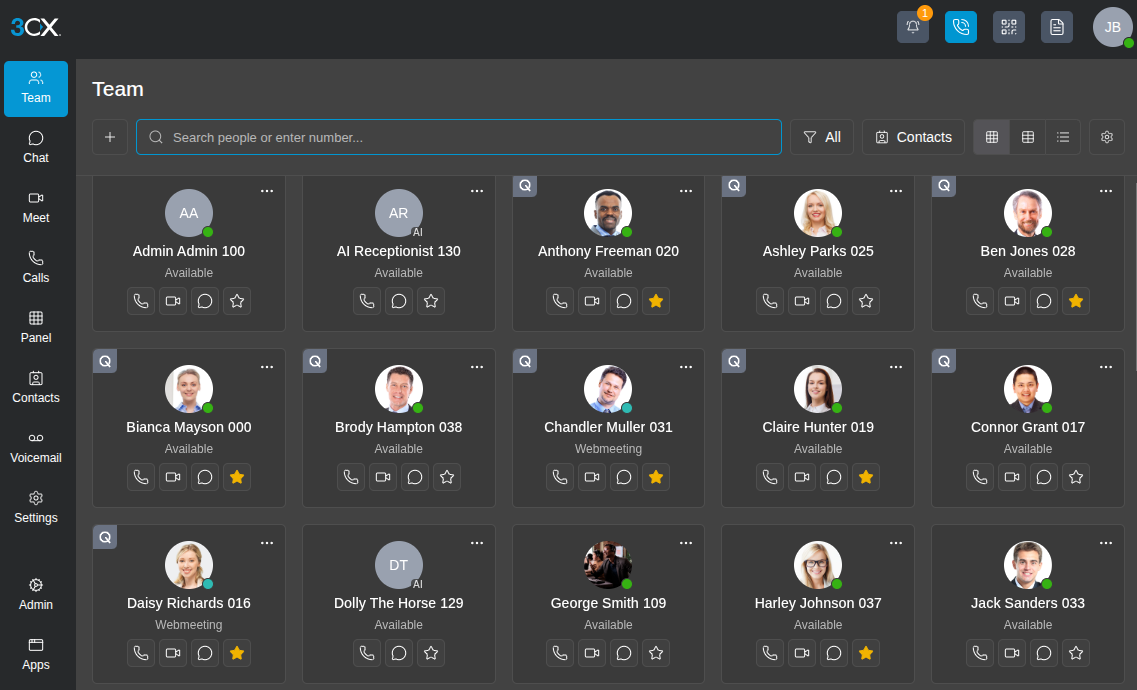
Update 9 introduces the most significant visual overhaul of the 3CX Web Client to date. We’ve completely redesigned the Web Client across nearly all major areas!
Team view, Dialer, Chat, Call History, Contacts, Voicemail and Settings have all been updated with a cleaner layout and improved usability. The aim is to reduce clutter and make everyday tasks faster. Along with the default Team view, it is also available in both comfortable and compact modes, allowing users to see more extensions and active calls at once. This is particularly useful for receptionists handling a high volume of calls.
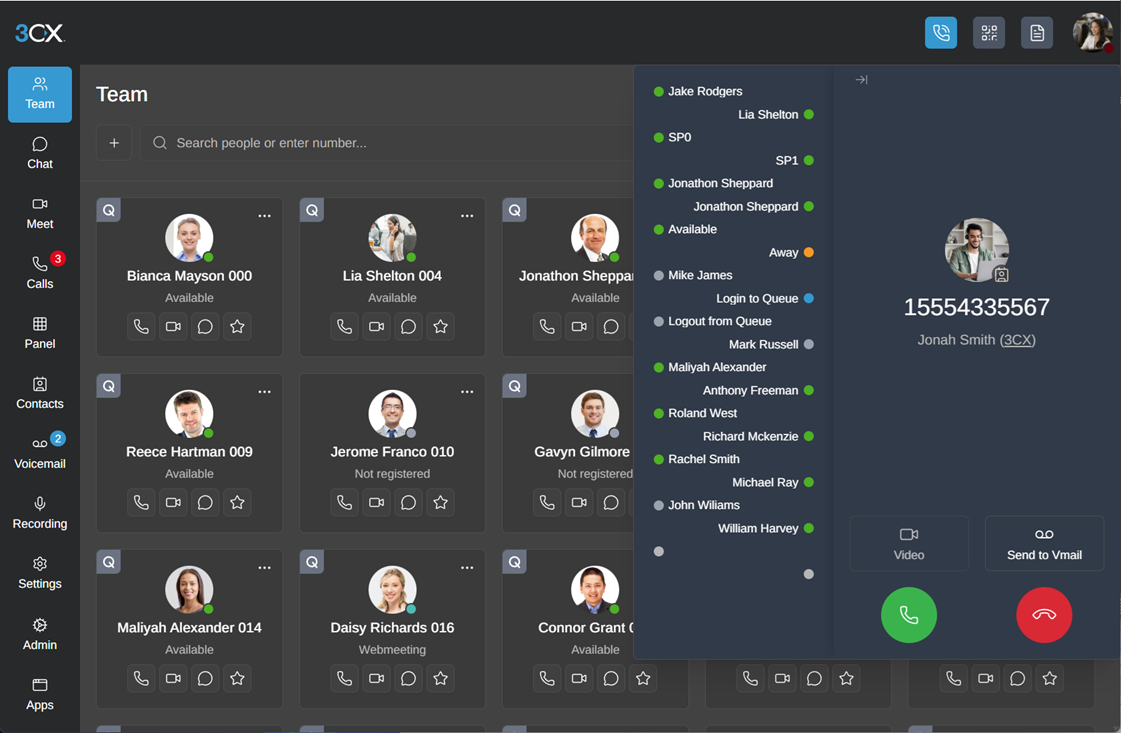
The dialer has been reworked to make it easier to place and manage calls without unnecessary distractions.
Navigation has also been improved with a simplified menu structure, reducing the number of clicks required to move between sections. In addition, PWA (Progressive Web App) support has also been refreshed with a cleaner provisioning flow.
Queue Features – Built for Real Call Centers
We’ve made significant improvements to queue behaviour.
- Callback on Request: Callers can request a callback after hearing an announcement, instead of being forced into an automatic callback flow
- Time-Based Escalation: Calls can escalate after a configured timeout, not just when agents are unavailable
- Cumulative Ringing: Skill groups are added progressively, allowing multiple groups to ring simultaneously without stopping earlier ones
- Comfort Prompts: Play one or more prompts to callers while they wait in the queue
- Estimated Wait Time: Announcements are based on actual agent statistics rather than fixed assumptions
- No Answer Prompt: Play a custom announcement before forwarding calls to the “No Answer” destination, aligning with other routing behaviour
These changes give much tighter control over SLAs and the caller experience. We’re covering these in more detail in a separate blog.
Real-Time AI Improvements
We’re busy behind the scenes continually improving our AI. There’s a lot to talk about which we’ll share in more detail in the next update. Watch this space for updates.
In the coming weeks, we’ll also be publishing further guides on how to configure and tune prompts properly, including common pitfalls to avoid.
For now, in brief here’s a recap of some real time improvements:
- Newer real-time models including gpt-realtime-1.5, significantly improving latency and tool execution during live interactions.
- Support extended to the latest OpenAI models, including gpt-5.4, improving response quality and flexibility across use cases.
- Prompt handling improvements – with more details on further improvements to follow shortly.
Other Features in Brief
- Number of user extensions: Now visible in the Admin Console.
- SMS API updates: Added support for Bandwidth and Voxtelesys.
- Custom VoIP Provider Template Builder: You can now build custom VoIP provider templates and store them in the system. We’ll be publishing more detailed information on the VoIP Provider Custom Template builder soon.
- Remote syslog: You can export system events and audit logs to external systems (UDP, TCP, TLS, mTLS).
- Play Department Holidays Prompt is activated for all trunks. You can now configure different prompts for different holidays from the UI without having to activate the holiday script on the trunk.
View the complete changelog here.
Get Started with Update 9 Beta
To try out these new features, upgrade to V20 Update 9 Beta.
- Log in to the Admin Console
- Navigate to System > Updates
- Select Update 9 Beta and click Download
⚠ Important: The Beta version should be installed for evaluation purposes only. It is not recommended for production systems.
Ready to enhance your business’s phone system?
Contact Empire Team to talk to an expert.
Contact Us
Empire Team Communication Solutions
Enhance Your Business with Expert Communication Solutions
Cambridge:
+1 (888) 330-6775
sales@ecitech.ca
https://www.ecitech.ca
Windsor:
+1 (888) 618-8847
sales@empire-team.com
https://www.empire-team.com
Serving clients across Canada and beyond